This tutorial will teach you how to send the email step by step .
First Step you have to download the Following Jar Files
- mail.jar
- activation.jar
And add in to the Libraries .
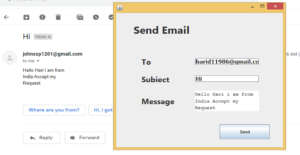
After that that you have to design the Email form look like above i shown.
You must Turn on the lesssecureapps https://myaccount.google.com/lesssecureapps . it Default comes as Turn off you must Turn on.
i attached the Source code below click and Download
i have attached the video link below. which will do this tutorials step by step.