This tutorial will teach you how to View records using python mysql to the table.
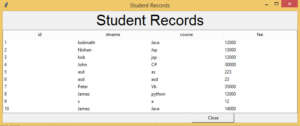
import tkinter as tk
from tkinter import ttk
import mysql.connector

def show():
        mysqldb = mysql.connector.connect(host="localhost", user="root", password="", database="smschool")
        mycursor = mysqldb.cursor()
        mycursor.execute("SELECT id,stname,course,fee FROM record")
        records = mycursor.fetchall()
        print(records)

        for i, (id,stname, course,fee) in enumerate(records, start=1):
            listBox.insert("", "end", values=(id, stname, course, fee))
            mysqldb.close()


root = tk.Tk()
root.title("Student Records")
label = tk.Label(root, text="Student Records", font=("Arial",30)).grid(row=0, columnspan=3)

cols = ('id', 'stname', 'course','fee')
listBox = ttk.Treeview(root, columns=cols, show='headings')

for col in cols:
    listBox.heading(col, text=col)
    listBox.grid(row=1, column=0, columnspan=2)
closeButton = tk.Button(root, text="Close", width=15, command=exit).grid(row=4, column=1)
show()
root.mainloop()
i have attached the video link below. which will do this tutorials step by step.