This tutorial will teach you Input two numbers to calculate and display the total.
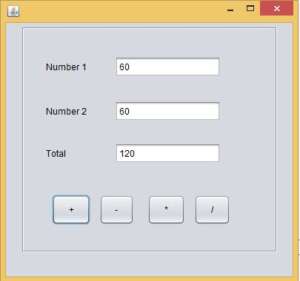
paste the code inside the + button
   int Num1 = Integer.parseInt(txtNum1.getText());
   int Num2 = Integer.parseInt(txtNum2.getText());

   int tot = Num1 + Num2;

   txtTotal.setText(String.valueOf(tot));
paste the code inside the – button
int Num1 = Integer.parseInt(txtNum1.getText());
int Num2 = Integer.parseInt(txtNum2.getText());

int tot = Num1 - Num2;

txtTotal.setText(String.valueOf(tot));
paste the code inside the * button
int Num1 = Integer.parseInt(txtNum1.getText());
int Num2 = Integer.parseInt(txtNum2.getText());

int tot = Num1 * Num2;

txtTotal.setText(String.valueOf(tot));
paste the code inside the / button
int Num1 = Integer.parseInt(txtNum1.getText());
int Num2 = Integer.parseInt(txtNum2.getText());

int tot = Num1 / Num2;

txtTotal.setText(String.valueOf(tot));