Up next in 10


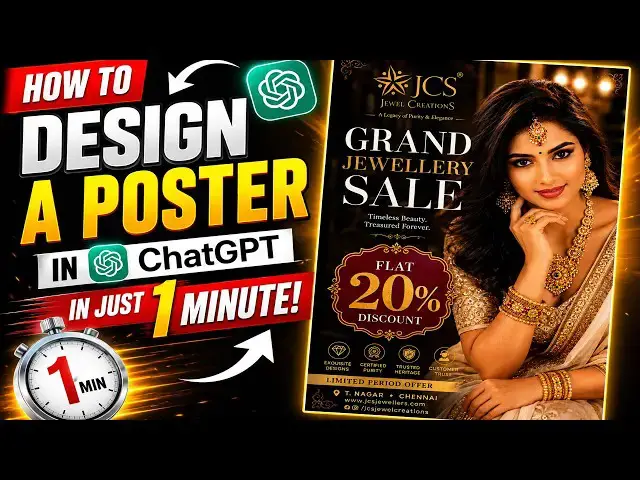
How to Design a Poster in ChatGPT in Just 1 Minute!
Show More Show Less View Video Transcript
0:01
Hi friends, welcome to Tutors Funny
0:02
Channel. Today I'm going to teach you
0:05
how to make this Instagram design very
0:08
professional and attractive way. So you
0:11
can see they are all the designs. So how
0:13
to make the design very professional?
0:16
Okay, so this kind of a design we will
0:18
be able to do it within 1 minute, okay?
0:20
So this don't worry, I'll show you this
0:22
everything I'll reveal.
0:24
Reveal my techniques, okay? So first
0:25
what I'm going to I'm going to go to
0:27
my
0:29
uh I'm going to go to the Pinterest
0:32
first.
0:32
The Pinterest is a very best tool to get
0:35
the idea. So go to Pins Pinterest.
0:39
Here you will you have to type the type
0:41
as a
0:43
uh
0:44
bridal jewelry
0:45
posters.
0:49
posters
0:53
poster design. So you can get a plenty
0:56
of designs. So you can select whatever
0:58
you need.
0:59
You can see whatever So there are plenty
1:01
of designs again.
1:03
So that you will be able to get one one
1:06
of the model here.
1:07
Whatever you you wish.
1:09
Okay, so that So I'm going to get this
1:12
You have to get one very beautiful one
1:14
you will be getting. If you like this
1:16
one look at this one.
1:19
This is very nice.
1:22
It's elegant look, okay? So whatever you
1:24
need. So this one or whatever.
1:27
Look at you getting whatever your
1:28
choice. So that
1:30
I'm going to
1:32
uh get it out of it.
1:34
Uh out of this. So So I'm going to get
1:36
this one. I like this one. So you can
1:38
select whatever you you need, okay? So
1:41
uh I'm getting this one as a I'm looking
1:43
for an Indian girl.
1:45
So this also the Indian sort of fashion
1:47
Indian girl, okay? So that
1:50
Uh this is very best. This is also the
1:56
So that this one also the very beautiful
1:58
here.
1:59
Very beautiful. So, I like this one.
2:02
I take this one. Okay, let's take this.
2:05
So, I'm going to this one.
2:08
First, I'm going to save it.
2:10
I'm saving my data.
2:13
These are
2:14
So, now what I'm going to do is I'm
2:16
going to go to my
2:18
ChatGPT.
2:22
I go to ChatGPT.
2:26
I'm going to tell my ChatGPT. First, I'm
2:28
going to go to my new
2:29
this plus symbol.
2:32
Open it my
2:34
design. So, this one is my design form.
2:36
This one. This is a design. Okay, this
2:38
is the my
2:40
uh
2:41
the design. So,
2:43
I'm going to this is a simple prompt.
2:45
So, what is the prompt is I given as a
2:47
refer above image. So, this is a
2:50
headline text. Grand jewelry sale.
2:53
Okay, this is a headline. You can given
2:55
whatever if it is.
2:56
Offer the 20% discount. You can
2:59
implement whatever dis
3:01
discount as you like. So, this is a
3:03
luxury design. Really it's everything I
3:05
implemented.
3:06
And click.
3:08
Now,
3:10
it is going to design it.
3:12
So, wait until the design is completed.
3:14
Okay?
3:16
Or that let's check
3:18
uh if it is
3:20
match with our
3:23
expert result. Let's check.
3:29
Okay, you don't worry if it is not
3:31
uh display as you expected. Don't worry
3:34
about that. You can tell them to edit to
3:36
redesign everything.
3:38
Okay, here there is a
3:39
things.
3:40
Okay, so now I'm working on the free.
3:42
You will be able to ask working as a
3:44
free
3:45
uh ChatGPT. If you are if you are moving
3:47
to the upgrade package,
3:49
we can
3:51
uh the poster we can generate the I
3:54
number of poster and we can generate the
3:56
very best design as well. Please go to
3:59
the upgrade plan as well.
4:01
So that free plan also we can so we have
4:03
limited image we can generate it. So
4:05
let's check.
4:07
The final and final touch.
4:10
Okay, it generated successfully. Let's
4:12
check our result will be.
4:15
Okay, so this is I have given that that
4:17
as I haven't changed any logo and all.
4:20
Given the
4:23
text as well here.
4:25
It's very good.
4:26
The colors combination as everything
4:28
also I I implemented the
4:31
color theme red and gold here. It's very
4:35
difficult look different look.
4:37
Very eye catching. If you are look at
4:38
this one
4:40
here.
4:40
Very good.
4:42
Okay, so now what I'm going to do is I'm
4:43
going to
4:45
change this one as a I need to change
4:47
the girl model as like this way.
4:49
I need to change the girl
4:52
girl model as Indian beautiful girl as
4:54
change the color color theme as well.
4:57
Need
4:58
more eye catching. Again I am not
5:01
satisfied this one. So again I'm going
5:03
to give the prompt.
5:05
So
5:06
you don't worry.
5:07
It will be design. Okay, so so this
5:11
design you will be able to try it
5:12
another way. Here it also here try.
5:16
Here there's options called try. So at
5:18
the most not available here here also
5:20
you can
5:21
try it. So here if you are give the
5:22
prompt properly accordingly it is
5:25
again it it's going to design.
5:28
So here
5:29
very good.
5:31
It's very eye
5:34
catching posters. Listen.
5:38
This is what nowadays the peoples are
5:39
doing with the
5:41
You have to give the prompt properly
5:42
then only that output will be displayed
5:45
as you wish.
5:47
Okay, so the key
5:50
What are prompt you given properly the
5:52
output will be
5:54
coming very high catching look.
5:57
Okay, so let's take.
6:12
Okay, it's take some time so that okay
6:13
designs here.
6:16
It's very nice here. Very nice.
6:22
You change the color and it's different
6:24
look here.
6:25
Very nice look.
6:29
Okay, here it's very nice.
6:32
Compared to this is a very nice design.
6:35
Okay,
6:36
I hope you guys you understood things
6:37
well. You have to
6:39
try try out this designs as well.
6:42
I'll see in my next lecturing so how to
6:44
this this design how to create as a nine
6:48
different ways as a single prompt I'll
6:51
be teaching in my next tutorial. Thanks
6:53
for watching.
#Jobs & Education