Up next in 10


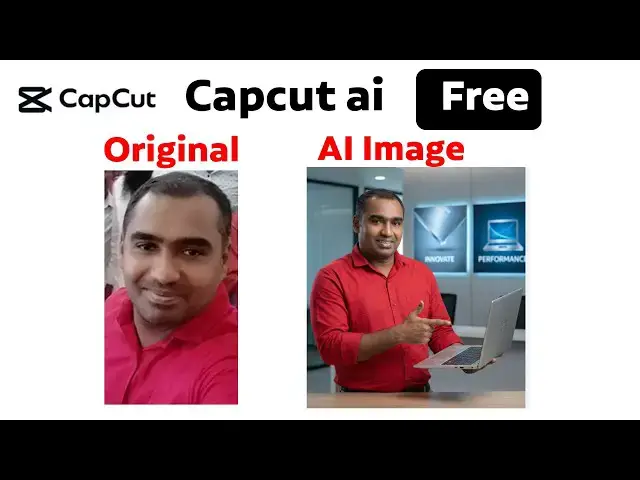
The Ultimate Free AI Tool for Image Creation Capcut AI
#capcutai #capcut videoediting
#capcuttutorial #capcuteditingtutorial
Show More Show Less View Video Transcript
0:00
Hi friends, welcome to tutors learning
0:02
channel. Today I'm going to teach about
0:05
the cap cut AI. Okay, it it is shown as
0:09
Nana Banana Pro. Okay, you can see if
0:12
you go to the official website of
0:14
Capkat. Okay, capat. You can see
0:18
capat.com.
0:22
If you open up, you can see, okay, you
0:25
have to login via your Gmail account.
0:29
Okay, you can this is the dashboard you
0:31
can get it. Okay. So after that you can
0:34
see in chat cap cut also nowadays it is
0:40
look like a canva. We have all the
0:42
templates are there. You can see this is
0:45
all the predefined templates are there.
0:47
Okay. These are the all the template you
0:49
will be able to use it if you are a
0:51
premium user. Okay. So what you're going
0:54
to do is see here this one for AI
0:58
design. Hold on. Click on it. Okay, this
1:02
one show free. Now here
1:06
it ask to upload the image. What's the
1:08
image? You can upload it. Okay, so it
1:10
based on the AI design created. Okay, so
1:13
I'm going to upload my image. Click on
1:15
it.
1:32
I'm going to click on this image. This
1:35
is my image. Okay. Then I'm going to
1:38
click on this image. Oh
1:42
yeah, this image. I'm going to click it.
1:44
Open it.
1:46
Okay. So this image is uploading. Got to
1:48
wait.
1:50
Okay. It's uploaded successfully. Now
1:52
I'm going to describe the enter your ID.
1:54
Upload the image to get started. So I'm
1:56
going to give this image.
2:01
I need
2:04
uh this image uh ex
2:08
this image.
2:12
I need to you to explain
2:26
this. I need you to generate
2:31
generate
2:34
this picture
2:38
guy. Uh the picture man
2:41
explain
2:44
about
2:48
about the laptop.
2:55
Laptop
2:59
like uh advertisement
3:03
like laptop advertisement like laptop
3:07
advertise
3:11
simple one. Okay. Click click.
3:17
Okay. Now you can say
3:20
what is the prompt you are type on it
3:24
the based on the prompt whatever prompt
3:27
you are given that uh result will be
3:29
display you have to wait until the
3:31
design is completed and you have to
3:33
produce the output. Okay.
3:38
Now you can see that picture it will be
3:41
creating. Okay. What is the that uh what
3:44
is the picture I gave here? You can see
3:46
that the same face the simple
3:50
there is a simple uh changes but that uh
3:54
what is the uh uh things I gave
3:57
according to the image will be display
3:59
here. It's very perfect. It will
4:01
generate the generate the photo is very
4:04
accurately uh it will be generated. This
4:07
is a very important secret. Okay. So
4:10
when you are doing the advertisement
4:12
with your photo you will be able to do
4:14
like this. You have to import this
4:16
photo. You can see here this is the
4:19
photo I imported. Okay. According to the
4:20
image will be created little bit changes
4:22
according to the face because that this
4:25
is the space it that AI took the photo
4:29
and little bit did uh different it will
4:33
be changed but that uh you will be able
4:36
to see this face also the same okay the
4:40
dress also the same dress you can see
4:42
the face is also similar but little bit
4:46
different but other things are same okay
4:48
you can see okay It it it here this
4:51
person is explain about the laptop
4:54
advertisement. Okay, this is the very
4:56
important secret of the
4:59
uh cap cut image generation. Okay, you
5:03
will be able to download this image and
5:05
you will be able to use it and this kind
5:07
of a things you will be able to see some
5:09
uh there is a person explaining
5:11
something else. The all the things are
5:13
done get it done by this kind of AI.
5:16
Okay. So this is a very this is a free
5:18
AI tool. you will be able to use it and
5:20
get the benefit of it. Right now it is
5:22
completely free. Okay, future we don't
5:24
know they are uh providing the price or
5:27
something else that now you are
5:28
completely free. Now you will at the
5:30
moment you can lose it and get the
5:31
benefit of it. Uh thank you for
5:33
watching.
Online Media
Multimedia Software
Jobs & Education